To make a custom desk mat, choose the size first, then add an image designed for that wide shape. The two most useful checks are whether the mat fits your desk and whether your favorite part of the image will stay visible around your keyboard.
Start with the Desk Mat product. Current sizes are 12 × 18, 12 × 22, and 16 × 32 inches. You can upload an existing image or create one during the design step after selecting product options.
Measure before choosing your desk mat size
Measure the usable area in front of your monitor stand. Arrange the keyboard as you normally use it, then move your mouse through a comfortable range. Include space for the cable, desk edge, and anything you need to keep on the hard desktop.
| Size, depth × width | Approx. centimetres | Image shape | Check on your desk |
|---|---|---|---|
| 12 × 18 in | 30.5 × 45.7 cm | 3:2 landscape | Compact coverage; test whether your keyboard leaves enough mouse space |
| 12 × 22 in | 30.5 × 55.9 cm | 11:6 landscape | Extra width without extra depth |
| 16 × 32 in | 40.6 × 81.3 cm | 2:1 landscape | More keyboard-and-mouse room; measure available depth too |
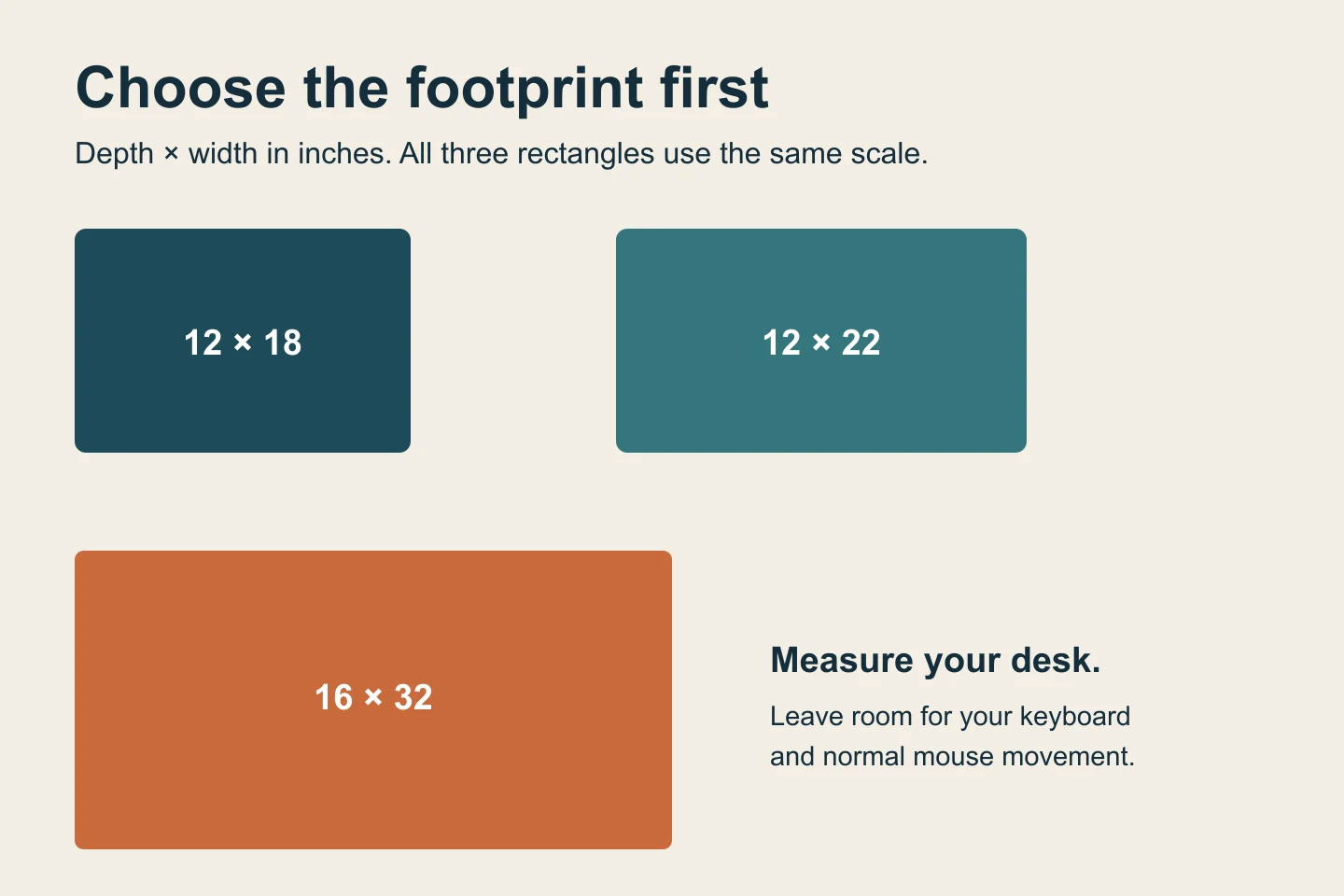
Cut or fold scrap paper to the footprint and place it on the desk. A mat that covers most of the desk is not automatically the best fit. If you only need mouse space, compare desk mats and mouse pads before choosing.
Design around your keyboard, not just the rectangle
Put a paper rectangle over the keyboard area of your image preview. What can you still see? Choose a subject toward an uncovered side, a landscape with interest across its width, or a repeat pattern that remains attractive wherever equipment sits.
- Travel photo: a coastline or mountain panorama with breathing room at both ends.
- Personal illustration: a pet exploring a miniature forest, with the character outside the keyboard zone.
- Calm workspace: layered curves, botanical shapes, or a restrained topographic pattern.
A useful starting prompt is: “A wide 2:1 illustration of a quiet coastal observatory at dusk, with the main building on the right and open sky and sea across the left, no text.” Adapt the subject placement to your keyboard position.
What happens when a square image fills a wide mat?
To fill a 2:1 rectangle from a square without stretching, the crop keeps all the width and only half the height. A centered crop removes roughly a quarter of the original from the top and another quarter from the bottom. This is why adding more pixels cannot solve every composition problem.
Use a wider source, choose a less severe crop, or revise the design with more background. Keep faces and lettering clear of the edges. Check the actual placement frame rather than relying only on the finished-size ratio.
Does the image need to be huge already?
Automatic AI upscaling is included with every order. Upload your best original. We prepare it for the selected product and print area, so you do not need to buy an upscaler or manually enlarge the file. AI upscaling can support much larger prints and improve apparent sharpness and detail. Severe blur, missing information, or incorrect generated text still need attention.
Use PNG, JPEG, or WebP up to 10 MB. The original download is usually better than a screenshot. If the source includes garbled lettering, incorrect faces, or heavy compression, correct those features before ordering. Our print-ready checklist covers the final review.
Place your order
- Select the Desk Mat and choose your size.
- Continue to the design step and upload or create an image.
- Move, zoom, or rotate it in the placement preview. Check the edges and keyboard zone.
- Review the selected options, price, and shipping before payment.
The preview shows placement, not a physical color proof. Screen glow and very dark details can reproduce differently on a printed surface.
Common questions
Can I use a phone photo?
Yes. Start with the original file and check how much of it fits the selected shape. The composition often matters more than the device used to take it.
Should I add tiny text?
Prefer a short, legible message with enough contrast. Review every character and make sure the keyboard will not cover it.
Do I have to prepare a production template?
No. Choose your options and review placement. Included preparation handles enlargement for the selected print area.
About this guide
Prepared by PrintAIArt, a seller of personalized printed products. Product options and upload requirements were checked against the current catalog and ordering flow on September 30, 2026. Product scenes are illustrative mockups, not evidence of a physical print test. Final preparation and fulfillment include operational review. Contact us about your image or a correction.